AgendaMatch allows you to ask MuniMins to insert headings that match the meeting's agenda.
In addition to creating matching headings, attaching an agenda allows MuniMins to accurately spell specific topics in the minutes.
AgendaMatch can also be used without inserting headings, solely for the purpose of improving spelling.
Using AgendaMatch for New Minutes
To use AgendaMatch for a new upload, click the downward arrow in the AgendaMatch section to expand it.

This will open up the AgendaMatch section.
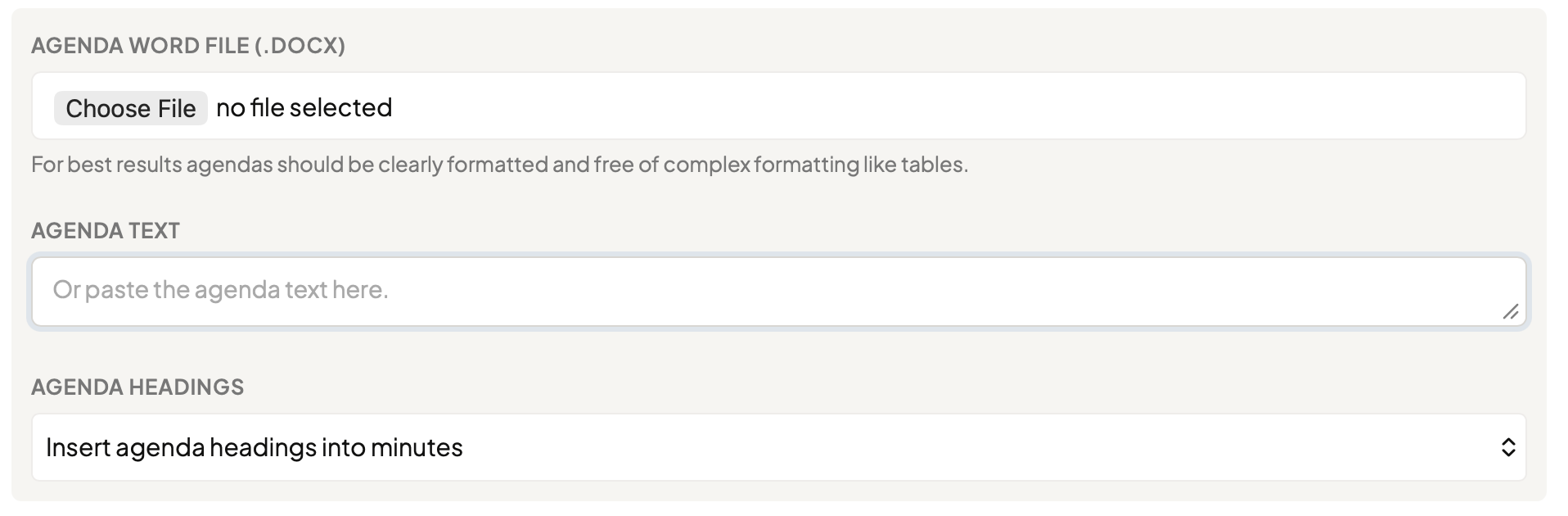
The meeting agenda can be attached as a Word document or copied and pasted as text. For direct text input, each topic should be separated on its own line. For Word uploads, complicated or unique formatting—including the heavy use of tables—should be avoided if possible.
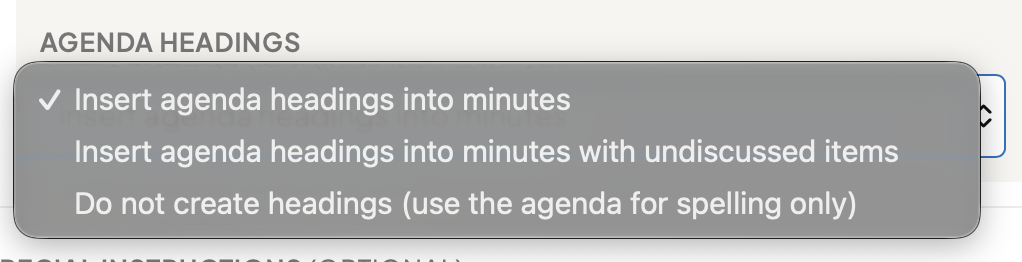
By default, MuniMins will use the agenda to insert headings into the minutes, but there are other options available:
- Insert Agenda Headings Into Minutes: Default behavior.
- Insert Agenda Headings Into Minutes with Undiscussed Items: If an item appears on the agenda but is not actually discussed in the meeting, MuniMins will still insert a heading for it in the proper order.
- Do Not Create Headings: MuniMins will use the agenda solely to improve the spelling of the agenda topics; no headings will be created.